





Play Traffic Run!: Driving Game Walkthrough
Traffic Run!: Driving Game
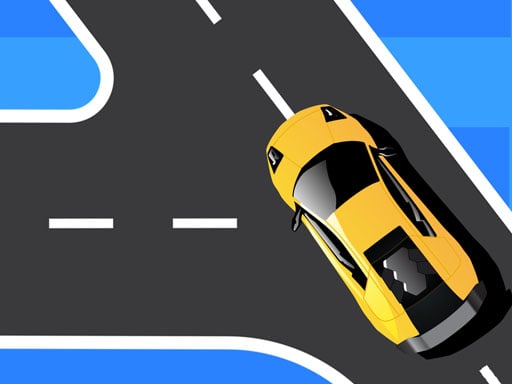
Challenge question Can you reach the finish line without bumping a single car… even when buses and trucks fly by? In Traffic Run!: Driving Game, the best drivers know when to wait. What you do in the game You guide a small car through streams of cross traffic. It’s not about racing. It’s about timing. You move in short bursts, stop instantly when it’s unsafe, and slip through gaps like you’re solving a moving puzzle. Core loop: Start the level and look at the traffic flow. Move forward when there’s a safe gap. Stop completely if you’re unsure. Reach the finish line to clear the stage. Optional: collect coins or stars only when they’re on a safe path. Real player moment: you see a perfect gap… then a big truck appears from the side you weren’t watching. That’s why you must scan, not stare. Controls Desktop Hold W / Up Arrow to drive Release to coast/stop Tap S / Down to brake harder (if your version supports it) Some versions allow A/D or arrows to switch lanes (only if shown) Mouse is mainly for menus Mobile Tap and hold to move Lift finger to stop instantly Some versions use swipe left/right to change lanes Big pause/replay icons How you win and how progress works You win each short stage by reaching the finish line without crashing. Levels get harder by adding: faster cross traffic, more lanes, trickier “two-step” crossings where you must stop in the middle. Coins and stars are side goals. Your real progress is learning gap timing. Reading traffic like a pattern Traffic often moves in waves. If you watch for one second, you can usually spot: a repeating gap, a lane that clears after a bus, or a “trap lane” that looks empty but fills fast. A quick safe-cross plan: Check left lane ✔ Check right lane ✔ Move in a short burst ✔ Stop again ✔ Tips to play better (11 tips) Stop is a power move. If you’re unsure, stop. Move in short bursts. One lane at a time is safer than a full send. Watch cross streets, not your hood. Your car is tiny; the danger is everywhere. Ignore coin trails that lead into traffic. Coins are never worth a crash. Learn the “bus rule.” Big vehicles block your view. Wait until you can see. Don’t chase a gap that is closing. Let it go. Another gap is coming. When two lanes cross, pause in the safe zone (if the level has one) before the next push. If lane switching exists, switch early. Late swipes cause side bumps. If you crash at the same spot, count the rhythm. Go on “one… two…” instead of guessing. If you keep getting clipped, you’re leaving too late. Start moving a tiny bit earlier. Coach voice: Scan. Breathe. Go. Tiny natural tip: If you keep getting hit right after you start moving, try a “mini-tap” first. It teaches your eyes how fast the traffic really is. Levels / modes / progression Most versions are level-based with quick stages. Some add: new car skins, tougher intersections, or extra coin goals. Common problems & quick fixes Car won’t respond after an ad/rotation: tap/click inside the game area to refocus. Lag in busy city scenes: lower graphics, reduce effects/draw distance if possible, close other apps. Touch timing feels off: set zoom to 100%, try fullscreen, and avoid resting a second finger on the screen. Progress/unlocked cars reset: allow cookies/local storage so saves stick. parent note: This game practices patience and decision-making. It’s a good “short session” game. Try “finish 5 levels, then break.” 5) Quick Info: Platform: Browser (HTML5), Desktop -->+ Mobile -->versions Genre: Timing driving / traffic puzzle Age fit: 7–13 Session length: 5–15 minutes Controls: Hold to drive, release to stop (keyboard or touch) 6) FAQ (5–7) Q1: Is Traffic Run a racing game? Not really. It’s a timing and crossing game. Q2: What’s the best beginner trick? Move one lane at a time and stop often. Q3: Should I collect every coin? No. Only take coins that are on a safe line. Q4: Why do I crash even when I look? You’re not scanning both sides. Watch left and right before every burst. Q5: My controls :stopped working—why? The game lost focus after an ad. Tap/click inside the game screen. Q6: Why does it feel harder later? More lanes and faster traffic make “waiting” more important. 7) Try These Next (6) Traffic Jam Hop On • Traffic Jam Escape: Car Puzzle • Chicken Crosser • Connect 2 Cars • Car Racing Fever • Rushy Racing
Similar Games
-
War Tanks Simulation 2022
-
Advanced pixel apocalypse 3 2022
-
Castle Defender Saga game
-
Commando Adventure
-
Car Parking Pro - Park
-
PokeWorld Bounce
-
Lily Dress Up
-
Traffic Run!: Driving Game
-
Hunter Assassin 2
-
PAPER FOLD ORIGAMI ONLINE
-
Minicraft Duello
-
The Last Defense Z
-
Chibi Sup Color Game
-
Best Battle Cover Royale 2022
-
Stumble Guys Puzzles
-
Deliver It Master