










Play Drive To Evolve Walkthrough
Drive To Evolve
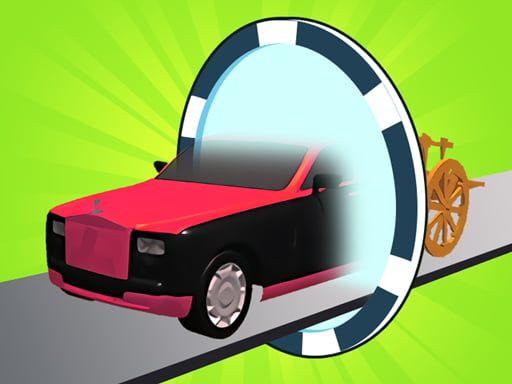
In Drive To Evolve, the scariest obstacle isn’t a wall… it’s a math gate. Pick the wrong one, and your vehicle can “evolve” the wrong way (or lose progress), even if your driving is perfect. What you do in the game Drive To Evolve is a 3D cartoon runner-style driving game. Your vehicle moves forward, and you steer left and right to: Collect marked items that help you evolve Avoid obstacles on the track Grab coins for upgrades Pick math gates that change your growth/income (like choosing × instead of +) Collect fuel (often shown as a red tank) so you can keep moving Reach the finish line to clear the level The first few levels feel easy—then you start seeing gates you really don’t want when you’re low on fuel. Controls Desktop Swipe/drag left and right to move and dodge. (Some sites describe it as “swipe to move and avoid,” even on computer.) Mobile Swipe left and right to steer around obstacles and line up gates. How you win and how upgrades work You win a level by evolving your current vehicle and finishing the track. Coins you earn can be used to upgrade your vehicle before starting a level (so future runs feel easier). Think of upgrades like “starting stronger.” Even a small upgrade can turn a tough level into a comfy one. Gates, items, and what they mean This game’s special twist is the math gates. One description explains it clearly: Choose gates that help you grow more (example: multiplication can be better than addition). Try to avoid gates that cause losses (example: division or subtraction). Along the way, pick up coins and fuel. You’re basically driving… and doing “fast choosing.” Tips to play better (11 specific tips) Look ahead for the next gate pair. Don’t stare at your vehicle—stare at what’s coming. Pick your lane early. Late swerves are how you clip obstacles. If you keep missing the good gate, move earlier than you think. Your finger is always “one step late” at first. Treat × as your “big grow” choice when it’s safe to reach. Avoid ÷ and − when you can. They’re described as losses, so only take them if there’s no safe path around. Don’t crash for coins. Coins help upgrades, but crashing can cost the whole run. Fuel first when you’re low. If the red tank fuel is on one side, it can be worth choosing the “okay” gate just to stay moving. Drive smoother near obstacles. Tiny left-right “wiggles” often hit more things than one clean move. When you see a bad gate coming, set up an escape lane. Move to the middle so you can jump left or right fast. Upgrade before you retry a hard level. If you’re stuck, spend coins first—then try again. Do one “practice run” where you ignore coins. Just learn where gates and obstacles appear. The next run will feel easy. Levels and progression The game is built around levels, and the challenge ramps up as you go. Between levels, you can use your earned money to upgrade so your next vehicle run starts stronger. Common problems & quick fixes Swipe won’t work / vehicle won’t move: Click/tap inside the game area once to give it focus (especially after ads). Lag or stutter: Close extra tabs, turn off battery saver, and avoid heavy full-screen on older phones. Touch feels “off”: Set browser zoom to 100% and try full-screen again. Progress not saving: Make sure cookies/local storage are allowed so upgrades can stick between visits. parent note: (2–3 lines) Drive To Evolve is a light driving game that builds planning and quick decision skills, plus basic number thinking with the gates. A good break rule: “Finish 3 levels, then stretch.” 5) Quick Info: Platform: Browser (HTML5), often listed for PC and Mobile -->web Genre: 3D arcade runner / vehicle evolution Age fit: 7–13 (simple controls, mild math choices) Session length: 5–15 minutes Controls: Swipe/drag left-right to move and avoid 6) FAQ: Q1: What’s the goal in Drive To Evolve? Evolve your vehicle by collecting items and choosing good gates, then finish the level. Q2: What do the math gates do? They change how much you gain or lose. One description recommends choosing multiplication and avoiding division/subtraction when possible. Q3: How do upgrades work? Coins you earn can be used to upgrade your vehicle before starting a level. Q4: What are the controls? Swipe (or drag) left and right to move and dodge obstacles. Q5: I keep losing—what should I fix first? Start choosing safer gates (avoid losses), then focus on clean dodges. If you have coins, upgrade before retrying. Q6: Is there fuel in the game? Yes, one description mentions collecting fuel in a red tank while you drive.
Similar Games
-
Baby Taylor Cooking Camp
-
Chocolate Cookie Maker
-
War Tanks Simulation 2022
-
Car Parking Pro - Park
-
PokeWorld Bounce
-
Bubble Shooter Pet Match 3
-
Funny Cotton Candy Shop
-
Lily Dress Up
-
Rabbit Dress Up
-
Girl Squad
-
Flower Shop Girl Dress up
-
Gear Car 3D
-
Motor Rush
-
Iron Snout - Fighting Game
-
Funny Animal Faces
-
Drive To Evolve